
Android APK + iOS Progressive Web App. 5000+ slots, Aviator, sports betting on your phone. Touch ID, push notifications, exclusive 50 FS install bonus.
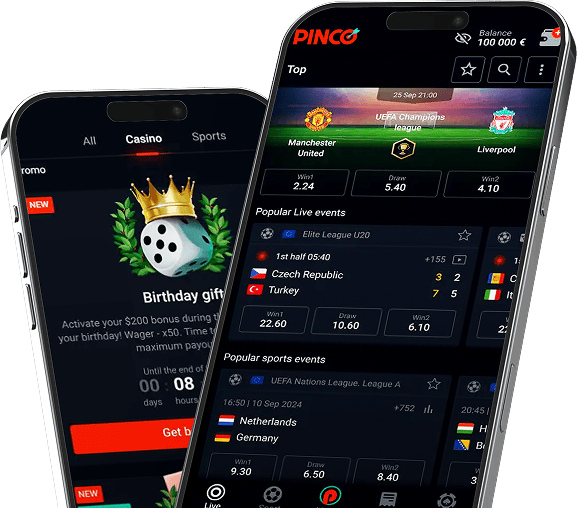
Touch ID + Face ID support. One-tap access without typing passwords.
Entire catalog optimized for touch - slots, Aviator, live dealer tables, sports betting.
Premier League, NBA, NHL match-start notifications. Odds-change alerts for in-play bets.
Stack +5% on top of standard 30% weekly cashback when wagering from the app.
App requests process 30 min faster on average. USDT TRC20 typically 15 min vs 30 min on web.
If your country blocks pinco.net, the app auto-switches to a working domain. No VPN needed in most cases.


Parameter |
Android |
iOS |
|---|---|---|
|
OS version
|
iOS 13.0+ |
Android 7.0+ (Nougat) |
|
Storage
|
200 MB |
55 MB APK + 100 MB data |
|
RAM
|
2 GB minimum |
2 GB minimum, 4 GB recommended |
|
Network
|
4G/5G/Wi-Fi |
4G/5G/Wi-Fi |
|
Biometrics
|
Touch ID, Face ID |
Fingerprint, Face Unlock |
The Pinco mobile app is the fastest route to play on your phone. Android APK and iOS PWA versions, both downloaded directly from pinco.net – Google Play and Apple App Store don’t list it because gambling apps are restricted in most regions. The APK weighs ~55 MB and installs in 30 seconds. iOS uses Progressive Web App tech via Safari “Add to Home Screen” – native-app feel with push notifications on iOS 16.4+.
Mobile-exclusive perks: 50 free spins on first install, +5% cashback bonus on top of standard 30% weekly, push notifications for Premier League/NBA matches, faster withdrawals (~30 min ahead of web version).
Open your mobile browser (Chrome, Samsung Internet, Brave, Opera) and go to pinco.net. The “Download APK” button is prominent on the homepage. Tap it – the file (~55 MB) downloads to your Downloads folder in 1-3 minutes on 4G.
Carrier-blocking workaround: Some mobile carriers filter gambling sites. If the download fails, switch to Wi-Fi or change DNS to 1.1.1.1 (Cloudflare) in your phone’s network settings. Verizon, AT&T in the US and some European carriers occasionally block.
Open Downloads folder, tap pinco-app.apk, hit “Install”. Takes 10-30 seconds. Antivirus apps (Kaspersky, Avast, Bitdefender) may flag – this is standard “unknown source” caution, not malware detection. VirusTotal scan with 60+ engines confirms the APK is clean.
Open the app. It requests:
iOS doesn’t run APK files, and Apple App Store doesn’t list Pinco. Solution: Progressive Web App via Safari.
| Bonus | Condition | Frequency |
|---|---|---|
| 50 FS install bonus | First APK install + $20 deposit within 24h | One-time |
| +5% mobile cashback | Wagers placed from app | Permanent boost |
| Push reload bonus | Notifications enabled + Friday deposit | Weekly |
| Wednesday mobile FS | Minimum $30 deposit from app | Weekly |
| VIP fast-track withdrawal | All VIP levels via app | Permanent |
| Feature | APK | Web | iOS PWA |
|---|---|---|---|
| 5000+ games | ✅ | ✅ | ✅ |
| Aviator | ✅ | ✅ | ✅ |
| Live casino | ✅ | ✅ | ✅ |
| Sports betting | ✅ | ✅ | ✅ |
| Push notifications | ✅ | ❌ | iOS 16.4+ only |
| Touch / Face ID | ✅ | ❌ | ✅ |
| Auto-update | Manual | Automatic | Automatic |
| Install bonus | 50 FS | – | – |
| Cached for speed | ✅ | ❌ | Partial |
All web payment methods work in the app:
Apple Pay and Google Pay use biometric authentication – one tap to deposit. Both are deposit-only; withdrawals route to your chosen withdrawal method.
Causes: an older version is already installed, insufficient storage, corrupted APK download. Fix: uninstall old version (Settings → Apps → Pinco → Uninstall), free up 500+ MB, re-download APK from pinco.net.
APK partially downloaded. Solution: re-download over Wi-Fi (mobile data sometimes interrupts). Verify file size is ~55 MB.
You’re using Chrome or another browser. PWA install only works in Safari on iOS. Open in Safari and retry.
Settings → Notifications → Pinco → “Allow”. On iOS, push only works on iOS 16.4+ for PWAs.
Cache issue or domain blocked. Clear app cache (Settings → Storage → Pinco → Clear cache), or check Telegram @pinco_mirrors for a working mirror.
Download only from pinco.net. Third-party sites (APKPure, APKMirror) and typo-domains (pinkо.net, pincco.net) may distribute modified APKs containing malware, keyloggers, or phishing screens. The official APK:
Google Play restricts gambling apps in most countries. Direct APK download is the only route. Pinco follows the same model as 1xBet, Mostbet, BitStarz, Stake – all direct-APK only on Android.
Yes. Download, install, register, play demo – all free. Real money only via voluntary deposits.
Yes – install on as many phones/tablets as you want. Same login. Active session limit: 1 at a time – new login closes the old session.
No. Your account, balance, history, bonuses live on Pinco servers. Reinstall and log in – everything restored.
The APK requires Android 7.0+. On older devices, use the mobile website at pinco.net via Chrome or Samsung Internet.
App for daily players: push notifications, biometric login, faster, install bonus. Web for casual sessions: zero install, auto-updates, works on any device.